Guide · Beginner · ⏱ ~5 min read
At this point you have your contract signed, your API credentials, and access to the Green Check web UI. This guide explains the different paths available for connecting your CRB customers to your account — so you can choose the approach that fits your existing workflow.
- The three CRB onboarding paths and when to use each
- Trade-offs between the UI-based and API-based approaches
- How and when Green Check ingests data after a CRB connects
- Where to get help when issues arise
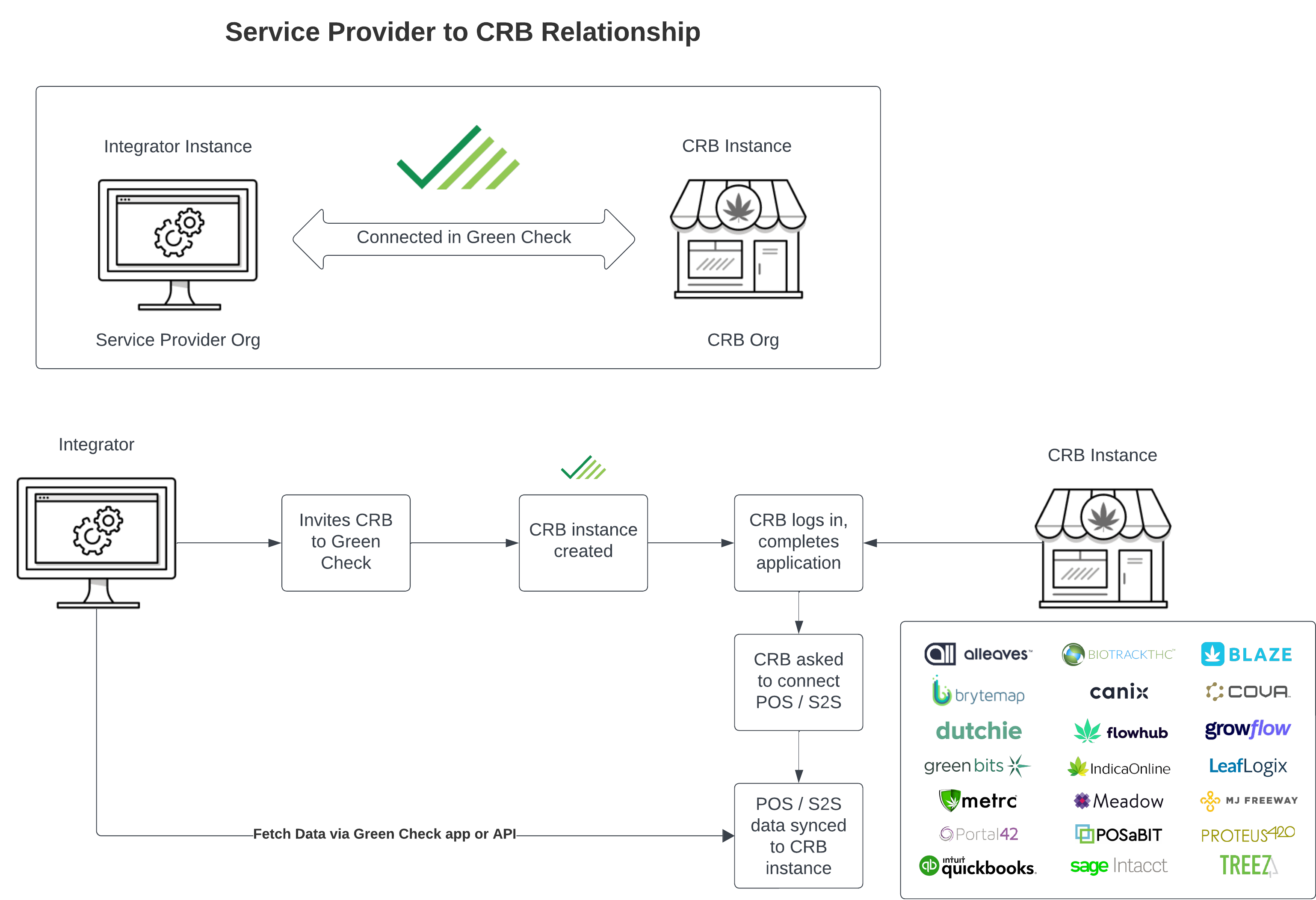
There are three ways to get a CRB connected to your account. All three result in the same end state — your account linked to the CRB and their data flowing in — but each has different requirements and trade-offs.
| Green Check UI invite | API — create CRB + Invite | API — create CRB + Connect Integration | |
|---|---|---|---|
| Best for | Full due diligence workflows | Blended Experience | No CRB Green Check Login |
| CRB effort | Moderate — completes a full application | Medium — submits basic info | Low + Self-service |
| License verification | Yes | Yes | No |
| Negative news alerts | Yes | Yes | No |
| Due diligence docs | Yes | Yes | No |
⚠️ Warning — Data sharing
Before connecting any CRB, ensure your contract with them includes explicit language about data sharing. Green Check's terms of service acceptance is only enforced through the UI invite path.
The UI invite flow is the most complete onboarding experience. You initiate an invite from the Green Check web app; the CRB receives an email, completes an onboarding application (collecting documents, license info, and any custom fields you've configured), and then connects their POS integration.
Once the CRB submits their application, you'll receive a notification to review and approve them. This review step lets you inspect uploaded documents, form responses, and license data before granting full access.
When to choose this path:
- You need to collect due diligence documents (licenses, insurance, financials)
- You want license monitoring and negative news alerts active for the CRB
- Your workflow includes a review/approval step before CRBs go live
💡 Tip — UI invite resources
See the Invite a new account guide and the managing accounts article for step-by-step UI walkthroughs.
The API path lets you create a CRB record programmatically with minimal required fields — just enough to establish the connection to a user. This will invoke the same onboarding journey as in Path 1 above, supplemented with additional info you might already know about the business. Once the CRB completes the application they are guided to make their POS/Invoice tracking system connection.
This path is well-suited for embedding into tools your customers already use. Common implementations include no-code form builders (Typeform, Featherly, Hubspot) or custom web forms built with frameworks like Python/Flask.
POST /service-providers/{sp_id}/crbs{
"org": {
"name": "Example Dispensary",
"state": "CO",
"business_type": "retail",
"template_id": "0dac3862-07e1-49a4-9025-6c01862d0c79"
},
"users": [
{
"firstName": "Jane",
"lastName": "Doe",
"email": "jane@example-dispensary.com"
}
],
"options": {
"onboarding_required": true
}
}When to choose this path:
- You want to blend data from your system with the onboarding process and materials collection of the first path.
- You're embedding the invite flow into an existing customer-facing app
- You don't want to manage the collection and passthrough of POS connection credentials and process.
- Having license verification and monitoring is important.
The API path lets you create a CRB record programmatically with minimal required fields — just enough to establish the connection to their integrated system. Users of the business will not receive an invite, but their CRB will be created and connected for data ingestion nightly.
This path is well-suited when you have sufficient notification to the business about your use of Green Check and want to keep users in your experience. The trade off of this is that license verification and monitoring is not enabled, due diligence documents and processes are not available, and connection issues and the ability to resolve them would not extend to the CRB.
POST /service-providers/{sp_id}/crbs{
"org": {
"name": "Example Dispensary",
"state": "CO",
"business_type": "retail",
"template_id": "123asd1-07e1-12a4-3212-123asxcd1c79"
},
"pos_info":
{
"pos_credentials":
{
"client_id_name": "mygrowflowclientid"
},
"pos_type": "GrowFlow"
}
"users": [],
"options": {
"onboarding_required": true
}
}When to choose this path:
- You want to keep the CRB in your experience.
- You're embedding the invite flow into an existing customer-facing app
- You're ok with having to collect and pass through credentials to establish the connection.
- Having license verification/monitoring and due diligence documents/processes in Green Check is not important.
⚠️ Warning — Compliance impact
CRBs onboarded via API (without a completed application) do not subscribe to license verification or negative news alerts, and compliance sale warnings will increase. Review the compliance rules engine guide before choosing this path.
Once a CRB connects their POS or invoicing system, Green Check automatically begins pulling their data on a recurring schedule.
| Data type | Frequency |
|---|---|
| Sales, products, customers | Nightly at midnight (CRB's local timezone) |
| Inventory | 4 times per day |
ℹ️ On-demand ingestion
You can trigger a manual sales data ingestion from the Green Check UI — useful for pulling initial data immediately after connection, or refreshing data after a CRB corrects something in their POS (e.g., a product category change). See kicking off a sales ingestion for instructions.
If you or a CRB runs into trouble, the Green Check support center has guides and how-tos for common issues. For anything not covered there, reach out to the team directly at support@greencheckverified.com.
- Integration overview — Core concepts, authentication, and the full list of API endpoints
- Retrieving CRB onboarding templates — Step-by-step tutorial for pulling application data and documents via the API
- API reference — Full schema and endpoint documentation